Finding music that fits a project should not feel like settling for something close enough. With AI Music Generator by Musick AI, it becomes easier to move from vague ideas to tracks shaped by genre, mood, composition style, and even vocalist preference, instead of spending hours searching for audio that only partly works.
Too often, the problem is not the lack of music. It is the lack of music that matches the exact tone of a scene, a campaign, a lesson, or a personal idea. Musick AI is built around prompt-based generation, instrumental creation, and genre selection, which gives users a more direct way to create music that suits a real purpose rather than forcing a project to adapt to whatever stock track happens to be available.
I. Why “Almost Right” Music Causes Real Problems
When the mood misses, the message weakens
A track can be technically good and still fail the job. If the rhythm feels too bright, the arrangement too heavy, or the style too far from the intended tone, the final piece loses focus. The AI Music Generator on Musick AI addresses this by allowing users to set inputs such as genre, mood, and composition style, which helps narrow the gap between the intended feeling and the actual result.
Generic libraries are not built for specific needs
Many creators need music for use cases with clear emotional or functional requirements, such as YouTube content, filmmaking, podcasts, education, or branded material. The Musick AI website describes music generation for content, entertainment, and many commercial uses, which makes it more useful for people who need purpose-built tracks rather than broad catalog browsing.
II. What Musick AI Actually Lets Users Control
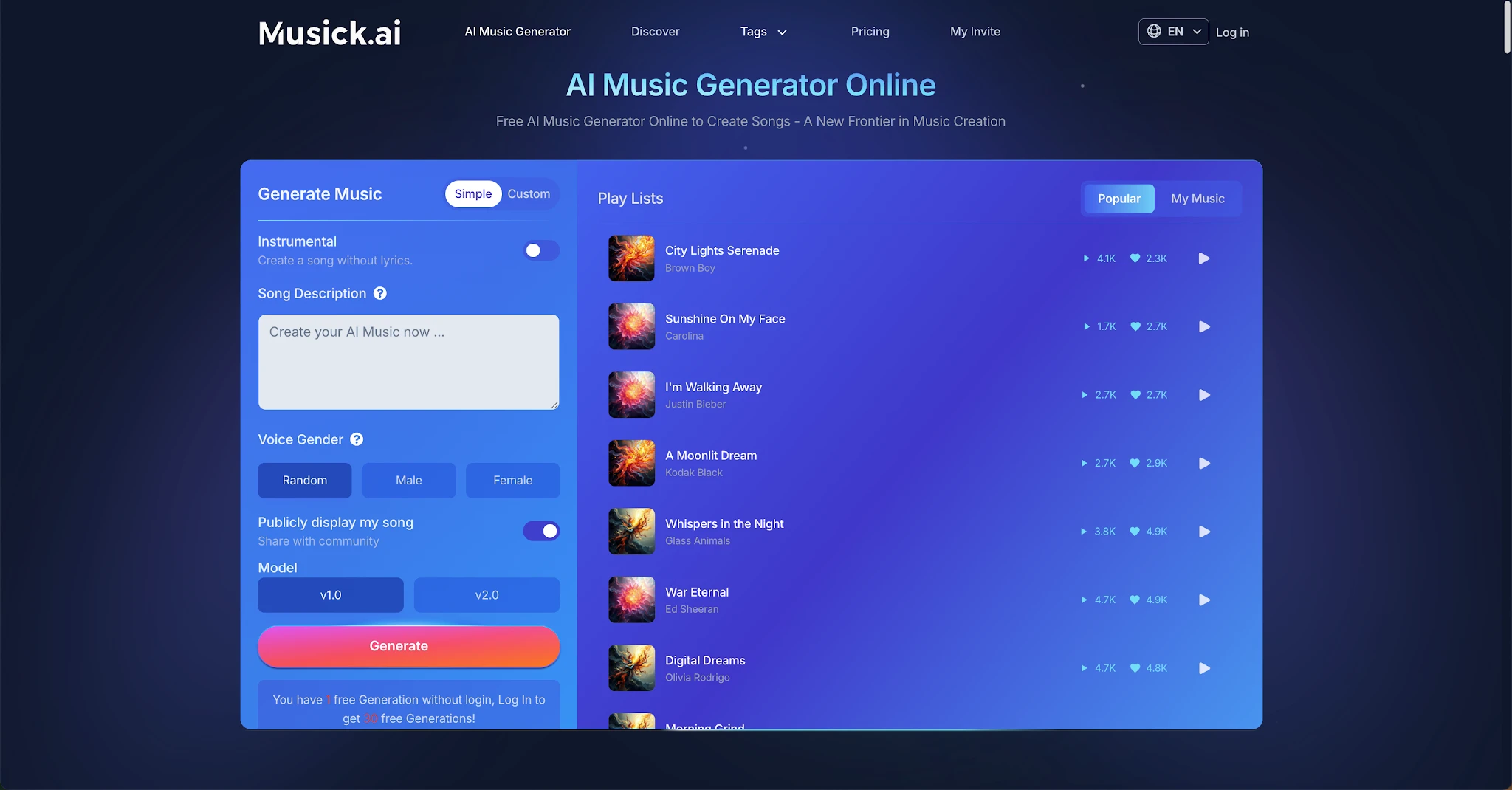
Prompt, genre, mood, and style
The site states that users can describe the style of music and topic they want, and it recommends using genres and vibes in the prompt. It also says users can set input parameters such as genre, mood, and composition style, which is important because practical music creation starts with controllable inputs, not random output.
Instrumental creation and vocalist preference
On the main generation interface, Musick AI explicitly offers an Instrumental option for creating a song without lyrics. The site also mentions choosing the vocalist’s gender as a preference, which gives another layer of direction for users trying to shape the feel of a generated song.
III. How to Get Better Results from an AI Music Generator
Start with the job the track needs to do
The most useful prompt is not the most complicated one. A better approach is to define the track’s role first: background music for a tutorial, a pop-style intro for a promo, a calm classroom piece, or a high-energy opener. Since Musick AI asks users to describe style and topic and supports parameters like genre and mood, a prompt becomes stronger when it is tied to a specific use instead of a loose concept.
Use concrete musical direction
The website’s own guidance suggests using genres and vibes instead of naming specific artists or songs. That means prompts work better when they include practical details like “uplifting pop,” “calm jazz,” “dramatic classical,” or “steady hiphop beat,” because those are the kinds of inputs the system is clearly designed to interpret.
Match the format to the project
Not every project needs a full vocal song. Musick AI includes an instrumental mode, which can be the better choice for presentations, background video, study material, or product explainers where lyrics would compete with spoken content.
IV. Choosing the Right Genre Instead of Forcing the Wrong One
The site supports a wide range of styles
Musick AI highlights many genres, including EDM, R&B, Jazz, Pop, Rap, Metal, Rock and roll, Hiphop, Blues, Reggae, Saxophone, Kpop, Classical, Disco, and Country. That variety matters because choosing a closer genre at the start often produces a track that needs fewer retries and feels more aligned with the project from the beginning.
Genre is not just a label
A genre choice helps shape pacing, instrumentation, and emotional direction. Someone producing a school performance piece, for example, may need a very different result from someone making background audio for a social clip, and the site presents Musick AI as suitable for school musical contexts, creator use, and entertainment scenarios.
In that sense, AI Music becomes more useful when it is treated as a practical production tool rather than a novelty. A clear genre decision gives the generation process a better foundation and reduces the chance of ending up with music that sounds polished but wrong for the task.
V. Useful Workflows for Different Types of Users
For content creators
The website says the tool can help generate royalty-free tracks for content and mentions use across social channels such as YouTube, Instagram, Facebook, LinkedIn, and Twitter. For creators, that means a faster route to intros, background tracks, and mood-specific cues that fit a video more closely than a generic library pick.
For educators and students
The site also mentions high school musical use cases and educational contexts. That makes the tool relevant for classroom projects, student productions, and simple concept demos where music needs to be created quickly without requiring advanced composition skills.
For brands and business use
Musick AI states that users can generate music for many commercial uses and describes music tailored to brand needs. For teams working on product videos, event recaps, internal presentations, or social assets, that kind of flexibility is practical because the soundtrack can be shaped around the message rather than patched in at the end.
VI. Related Tools That Expand What You Can Make
More than one type of music workflow
The site does not stop at basic song generation. It also lists an AI Song Lyrics Generator, an AI Beat producer, and an AI Rap Generator, which suggests that users can approach music creation from different starting points depending on whether they begin with lyrics, melody notes, or genre-led direction.
A better fit for rough ideas
That matters because not every project starts with the same kind of creative spark. Some users have a mood in mind, some have a beat pattern, and others begin with words; Musick AI reflects that by offering separate tools instead of forcing every user into one fixed path.
VII. What to Do Before Clicking Generate
Use a short checklist
Before generating a track with an AI Song Maker or AI Music Maker, it helps to define:
- The project type.
- The target mood.
- The closest genre.
- Whether lyrics are needed.
- Whether a vocalist preference should be set.
Aim for “fit,” not just novelty
A useful track should do more than sound good on its own. It should fit the purpose, support the message, and make the final piece feel complete. Instead of settling for music that is only close, use Musick AI to shape something that better matches the scene, the mood, and the work it needs to do.